AuraLab
© 1999 - 2026 Amperes Electronics Sdn Bhd. All Rights Reserved.

AuraLab
Acoustic Simulation Platform by Amperes Electronics
Build by professionals for professionals

WHAT IS AURALAB
AURA stands for Audio Utility Rendering Analysis, reflecting its purpose in helping users visualize, analyze, and optimize acoustic performance with greater precision.
AuraLab transforms conventional presentations into professional, data-driven proposals by providing simulated speaker coverage and acoustic performance mapping before installation begins.

Build Your Space
Define room dimensions, height, materials and audience zones.

Add Equipment
Select suitable products from the integrated Amperes speaker library

Run Simulation
Calculate SPL, STI, RT60 and other key acoustic performance metrics.

Analyze & Export
Review visual results and generate a professional technical report.
HOW IT WORKS
Build. Simulate.
Analyze. Present.
With AuraLab
Visual acoustic simulation
SPL, STI and RT60 analysis
Optimization before installation
Integrated PDF reporting
Clearer, data-backed proposals

Traditional Design
Manual estimation
Limited visualization
Higher risk of rework
Separated reporting process
Harder to explain to clients
WHY AURALAB
A smarter alternative to trial-and-error planning.
key features
Everything You Need for Acoustic Planning

3D Room Modeling
Create realistic room layouts by defining dimensions, surfaces and architectural elements for accurate acoustic simulations.

amperes Speaker Library
Access a comprehensive library of Amperes loudspeakers with real product specifications for realistic simulation results.

Listener Position Analysis
Evaluate sound pressure levels, speech intelligibility and listening conditions at multiple audience positions.

browser-Based Platform
Run simulations instantly from any modern web browser with no software installation or updates required.

ISO View
Visualize your room and speaker arrangement in an intuitive isometric view, making system planning easier and more realistic.

Easy-to-use Software
Design rooms, position speakers and generate professional simulation results through a simple, guided workflow.
FREQUENTLY ASKED QUESTIONS
Common Questions Answered
Find answers to common questions about using AuraLab, simulation results guidance, platform features and how to get started.
Yes. AuraLab is available free of charge for registered users via the platform. For more information, please refer to our Terms of Use.
Yes. AuraLab is designed as a web-based acoustic simulation platform.
No separate desktop installation is required for the intended web experience.
Yes. AuraLab allows you to generate professional PDF reports containing project information, selected equipment and simulation results.
The platform focuses on SPL mapping, STI analysis and RT60 reverberation calculation.
Yes. Registered users can save, revisit and update their simulation projects at any time.
It is suitable for consultants, integrators, contractors, distributors, installers and project owners. As part of our commitment to supporting our partners’ growth, AuraLab is provided as a complementary value-added application for Amperes users.
No. AuraLab is designed to be intuitive for consultants, contractors, system integrators and other professionals involved in PA system design, while still providing advanced engineering metrics.
Yes. It can support education, commercial, healthcare, transportation, industrial and other built environments.
No. AuraLab is designed exclusively for Amperes products. Only Amperes loudspeakers and system components are available within the simulation platform to ensure accurate product selection and system design.
AuraLab provides simulation results as engineering guidance and reference only. Actual performance may vary depending on installation conditions, room characteristics, building materials and environmental factors. For more information, please refer to our Terms of Use.
Legal Disclaimer
AuraLab is designed to support Amperes Public Address System planning and acoustic evaluation. Simulation results are intended as reference only and should be verified before final implementation. Please review the following terms, limitations and responsibilities before using the platform.
SPL MAPPING
See sound coverage instantly.
Interactive heatmaps reveal how sound is distributed across the listening area, helping you identify weak spots, excessive levels and opportunities to improve speaker placement.
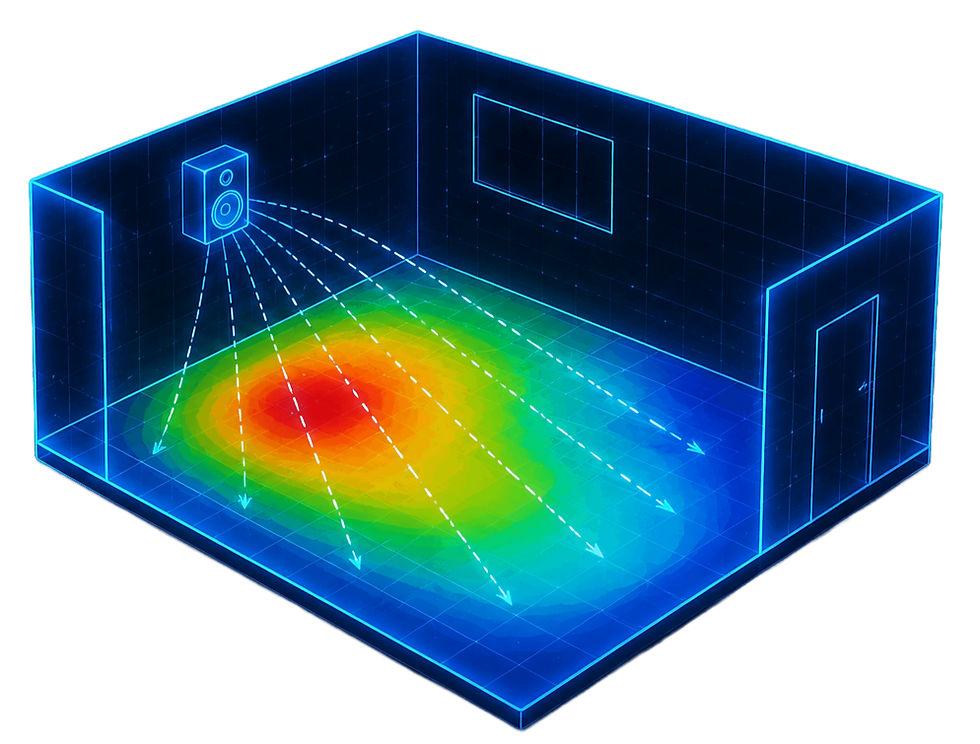
SPL Mapping
Visualize sound pressure coverage with heatmaps.
sTI pA Analysis
Evaluate speech intelligibility performance.
RT60 Calculation
Understand reverberation behaviour.
Professional Reports
Export proposal-ready results.
advanced simulation tools
From acoustic data to clear design decisions.
AuraLab combines visual simulation, practical engineering metrics and presentation-ready output in one accessible web platform.